by Martin | Apr 8, 2021 | Uncategorized
This is remarkably easy.
If you’re concerned about security and you want to send a code to a mobile or email here’s how to do it.
• Let the user sign in as usual, using their username and password. FileMaker will reject them if they are not already registered as a user.
• In the start up script File > File Options > Script Triggers > OnFirstWindowOpen just make sure they land on a layout that has nothing.
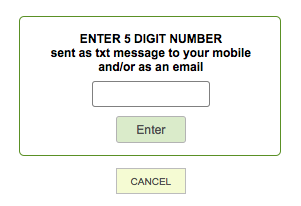
• Well nothing much. No links to anything, just a global text field and a button.
• In the start up script before you land on this page go to a table that has ‘UserName”, “Email’ and ‘Mobile’ values.

• Set a $$ variable – a random generated 4 or 5 digit number (or alpha numeric – your choice)
• Either send that that to their email.
• Or after opening an account with https://www.textlocal.com (the people I use) use the ‘open url’ to send an easily generated string and they’ll create and send the sms.
• Seconds later – but I’ve known it to take 10 minutes 🙁 – enter the received code into the global field on the landing page and click the button.
• If the $$ variable ( ie random code) = what they enter into the field let them go to their home page.
• Otherwise say ‘not this time mate’ and quit the system
by Martin | Apr 6, 2021 | Uncategorized
It’s annoying isn’t it that not everyone was born on the 1st Jan. If they were then all we’d have to do is…
Year ( Get(CurrentDate) ) – Year ( Date_Born ) // Date_Born is the name of the field with their date of birth.
But as it is we have do do the year bit, and then work out month wise have re reached their birth month yet, and then day wise have we reached their birthday yet. So the calc looks like this…
Case(
// XXXXXXXXXXXXXX not born in this month
Year(Date_Born) < Year( Get( CurrentDate))
and
Month(Date_Born) < Month( Get( CurrentDate)); Year( Get( CurrentDate)) – Year(Date_Born);
Year(Date_Born) < Year( Get( CurrentDate))
and
Month(Date_Born) > Month( Get( CurrentDate)); Year( Get( CurrentDate)) – Year(Date_Born) – 1 ;
// XXXXXXXXXXXXXX If born in this month check dates
Year(Date_Born) < Year( Get( CurrentDate))
and
Month(Date_Born) = Month( Get( CurrentDate))
and
Day(Date_Born) < Day( Get( CurrentDate)); Year( Get( CurrentDate)) – Year(Date_Born);
Year(Date_Born) < Year( Get( CurrentDate))
and
Month(Date_Born) = Month( Get( CurrentDate))
and
Day(Date_Born) > Day( Get( CurrentDate)); Year( Get( CurrentDate)) – Year(Date_Born) – 1 ;
Year(Date_Born) < Year( Get( CurrentDate))
and
Month(Date_Born) = Month( Get( CurrentDate))
and
Day(Date_Born) = Day( Get( CurrentDate)); Year( Get( CurrentDate)) – Year(Date_Born) ;
// XXXXXXXXXXXXXX If born in this year not 1 yet
Year(Date_Born) = Year( Get( CurrentDate)); “0” ;
“<1”)
by Martin | Apr 6, 2021 | Uncategorized
On the hosted server I’d set up 3 fields with conditional value lists based on the previous field and it was working a treat. But only using FileMaker client software.

In FileMaker WebDirect it really went pearshaped.
The 3 fields were Sector, Category and Item.
To start with clicking ‘sector gives the correct ddl: food, drink and produce.
What ever you chose in ‘sector’ clicking ‘category’ gives the drinks conditional value list
and then whatever you chose in ‘category’ clicking ‘item’ only gives the wine conditional value list

Click the various buttons half a dozen or more times eventually gets it to work.
Interestingly this is the case if you select ‘produce’ in sector.
However I’ve subsequently found that choosing ‘food’ in category seems to make it work – quicker.
Seemed like a download issue. But couldn’t find any hint of this online.
So tried entering all values in an opening script and it works a treat 😉

by Martin | Apr 6, 2021 | Uncategorized
Client gave me one of those ‘just’ jobs. A dashboard graphic, that I thought I might have to get a colleague to do in javascript. Didn’t realise how easy it would be to do in native FileMaker.

In layout mode it’s 3 elements: a coloured bar, overlaid with a number of conditional ticks and a merge field with the actual percentage.
The multi coloured bar was just a rectangle, but instead of being filled with a solid colour I chose gradient and filled it like this…

The ticks were hidden with a range of calcs like this… Traffic_Light < 60 or Traffic_Light ≥ 70
I could have overlaid it with more ticks with smaller ranges. But <10. 10-20, 20-30 etc works great.

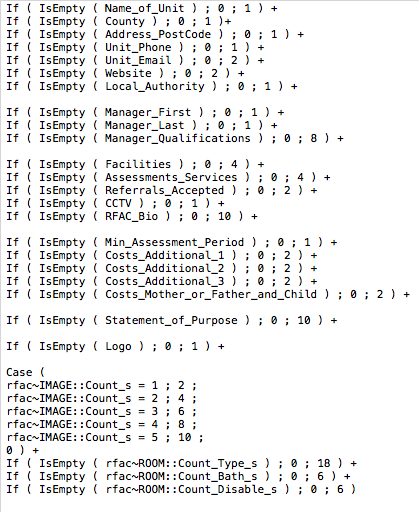
The last thing I had to do was the most time consuming. The client gave me a list of values against a range of fields that needed a value.
by Martin | Jan 19, 2021 | Uncategorized
It’s a simple thing to have to do – removing duplicates but there’s a certain (FileMaker) logic that one has to follow…
[1] Find the set of duplicate records.
• It might be as simple as entering find, inserting ‘!’ in one field and hitting return.
• But again you might need to concatenate a field from a number of fields. ie Name_First & Name_Last & Address1 & Address2 & Town & Postcode & Mobile…
[2] Sort
[3] Go to first record, remember details
[4] Go to next record, if same, omit or duplicate.
[5] Repeat.
Now when FileMaker does the above you have to follow it’s logic: • Omitting or deleting a record from a list, the focus goes to the next record (not the one before). • You’ll also need to consider if there are more than one duplicate records. • How to loop, when to loop, how to get out the loop. • Ifs and what not ifs – commonly known as Else Ifs
by Martin | Jan 19, 2021 | Uncategorized
ANOTHER QUESTION
I don’t need a dynamic portal, just a set of records to show in a portal with the records filtered by multiple criteria
e.g. ::ProofReady = “No” and ::CaseNoteCheck = “No”
but it then shows no results (even though there are some that meet that)
I can filter one criteria fine but not two so I think I am missing something silly?
Longway round I could make a calc unstored that combines the fields and then filter results to say
::Newlongwayaroundcalc = “NoNoYesMaybe”
Jake
ANOTHER ANSWER
You could do it that way. Have a concatenated field with the values in in the child table. And then in the portal set up dialogue > Filter portal records, enter parent>child field:Conatenated = “NoNoYesMaybe”.
Or without creating the new concatenated field in the portal set up dialogue > Filter portal records enter
parent>child field:One = “No” and
parent>child field:Two = “No” and
parent>child field:Three = “Yes” and
parent>child field:Four = “Maybe”
Martin

