
Which is easy enough…
Then I want to have it so you can break down the list into departments, which is easy enough as it’s just a find script that will be basically set fields “in production” & “desired department”
But then I have the problem,
The departments are very different with production methods, for example, an “SV” order would have Printed check while SE would have Engraved check. With so many different fields it would look messy to have every ‘crafting’ field per order.
My only ‘solution’ is to have a list view per department and try to keep them looking uniform as possible. The user ‘thinks’ they’re staying on the same layout but actually its changing.
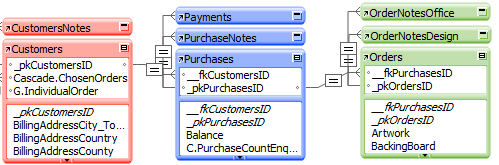
What I would prefer is almost a form view with a large tab control with each tab being a department and then each with a filtered portal showing all orders of that criteria. But I am doing it wrong (if it’s even possible) as it only shows a couple of records at a time. I wondered if I need to make another TO and self join(?) and somehow show records from that?
I am juggling what’s easiest and what’s best?
MY SUGGESTION:
All your suggestions are possible solutions. What I’d be tempted to do though, is do it all via scripts. Those scripts could be linked to tabs via a script trigger set to On Object Enter. Each tab having a filtered portal.
But I’d prefer to do it via buttons in the header of a standard list view.
The other thing I’d do is to stick the filter values in one field set up as a checkbox.
So a button would do a find for “SV” and “In Production”. If many departments are clicked, and you only wanted to find one, then the find would have to use PatternCount ( Field`:Dept ; “SV” = 1 )
