
A filtered portal in FileMaker is logical. If you want to filter by say ‘colour’
In the relationship diagram instead of the relationship being between the fields
Parent_Table::ID = Child_Table::ID_Parent
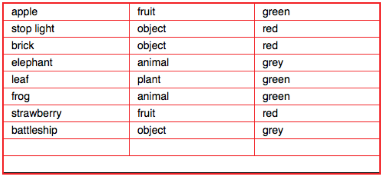
[1] Create another field in the parent table called something like Child_Portal_Filter, and make the relationship
Parent_Table::ID = Child_Table::ID_Parent
and
Parent_Table::Child_Portal_Filter = Child_Table::Colour
[2] Create a value list of colours. Either hard code them in or make them show Child_Table::Colour
[3] Set up the portal on the layout based on the Parent_Table
[4] In the 4th tab of the Inspector set the ‘control style’ of both fields Parent_Table::Child_Portal_Filter and Child_Table::Colour to be a pop-up menu or drop-down list of the value list.
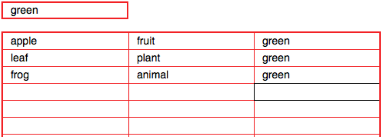
Notice that if no colour is set in Parent_Table::Child_Portal_Filter then NO records are shown – as opposed to ALL records.
To do that, you need to create another field with a value list of the colours and the word ‘All’ and use the PatternCount function